# Settings

## Clustering

---

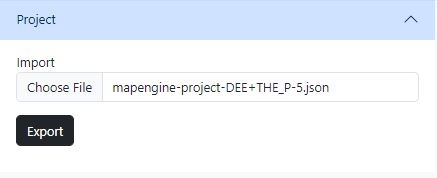
Clustering is used to group nearby markers together.

<table border="1" id="bkmrk-option-description-e" style="border-collapse: collapse; width: 100%;"><colgroup><col style="width: 50%;"></col><col style="width: 50%;"></col></colgroup><tbody><tr><td style="vertical-align: top;"><table border="1" style="border-collapse: collapse; width: 100.388%; height: 229.797px;"><colgroup><col style="width: 38.7868%;"></col><col style="width: 61.0838%;"></col></colgroup><tbody><tr style="height: 29.7969px;"><td style="background-color: rgb(236, 240, 241); height: 29.7969px;">**Option**</td><td style="background-color: rgb(236, 240, 241); height: 29.7969px;">**Description**</td></tr><tr style="height: 30.1094px;"><td style="height: 30.1094px;">`Enable Clustering`</td><td style="height: 30.1094px;">Toggles clustering on or off</td></tr><tr style="height: 46.5938px;"><td style="height: 46.5938px;">`Min Zoom`</td><td style="height: 46.5938px;">Minimum zoom level at which clusters are generated</td></tr><tr style="height: 46.5938px;"><td style="height: 46.5938px;">`Max Zoom`</td><td style="height: 46.5938px;">Maximum zoom level at which clusters are generated</td></tr><tr style="height: 30.1094px;"><td style="height: 30.1094px;">`Radius`</td><td style="height: 30.1094px;">Cluster radius (in pixels)</td></tr><tr style="height: 46.5938px;"><td style="height: 46.5938px;">`Extent`</td><td style="height: 46.5938px;">Tile extent - radius is calculated relative to this value</td></tr></tbody></table>

</td><td>[![image.png](https://wiki.sumnersd.org/uploads/images/gallery/2023-11/scaled-1680-/B0VTUPtl71HDVT1E-image.png)](https://wiki.sumnersd.org/uploads/images/gallery/2023-11/B0VTUPtl71HDVT1E-image.png)

</td></tr></tbody></table>

## Project

---

<table border="1" id="bkmrk--1" style="border-collapse: collapse; width: 55.3086%;"><colgroup><col style="width: 100%;"></col></colgroup><tbody><tr><td>[![image.png](https://wiki.sumnersd.org/uploads/images/gallery/2023-11/scaled-1680-/7VncJ4lJ3UA6zf2n-image.png)](https://wiki.sumnersd.org/uploads/images/gallery/2023-11/7VncJ4lJ3UA6zf2n-image.png)

</td></tr></tbody></table>

### Exporting

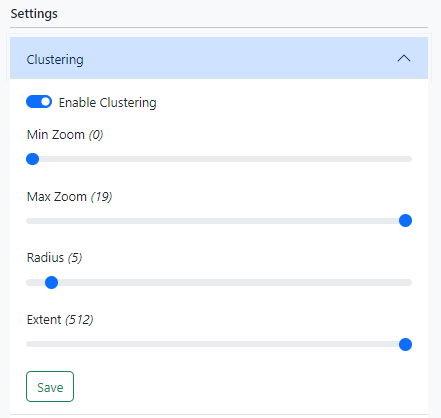
Clicking the **Export** button will save your sources and layers to a file and download it to your device.

### Importing

Clicking the **Choose file** button will prompt you to upload a MapEngine export file. The application will remove any existing data and rebuild the sources and layers (*including their visibility, style, target filter, and relationships*) contained in the export file.