# How To Reset Your Password

#### **If You Are Able To Login**

---

**1**. Login to RapidIdentity

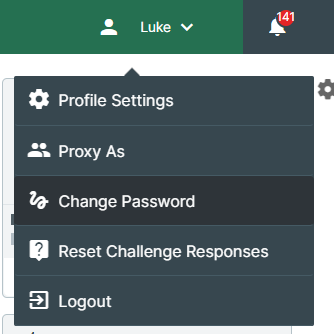
**2**. In the top-right corner, click on your name. A drop-down menu will appear.

**3**. Click the **Change Password** button in the drop-down menu

<table border="1" id="bkmrk--0" style="border-collapse: collapse; width: 34.9383%; height: 215px;"><colgroup><col style="width: 100%;"></col></colgroup><tbody><tr><td>[![image.png](https://wiki.sumnersd.org/uploads/images/gallery/2023-01/scaled-1680-/zw7UlStqNwufADFE-image.png)](https://wiki.sumnersd.org/uploads/images/gallery/2023-01/zw7UlStqNwufADFE-image.png)

</td></tr></tbody></table>

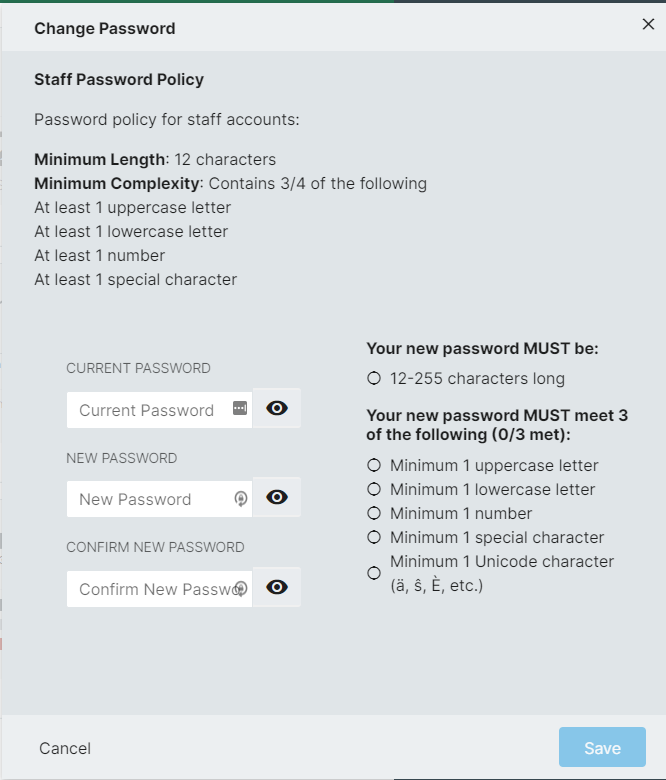
**4**. Follow the prompt to set a new password

<table border="1" id="bkmrk--1" style="border-collapse: collapse; width: 42.2222%; height: 515px;"><colgroup><col style="width: 100%;"></col></colgroup><tbody><tr><td>[![image.png](https://wiki.sumnersd.org/uploads/images/gallery/2023-01/scaled-1680-/t9VtAXTA00JUVO8b-image.png)](https://wiki.sumnersd.org/uploads/images/gallery/2023-01/t9VtAXTA00JUVO8b-image.png)

</td></tr></tbody></table>

**5**. Click the **Save** button

#### **If You Are Unable To Login**

---

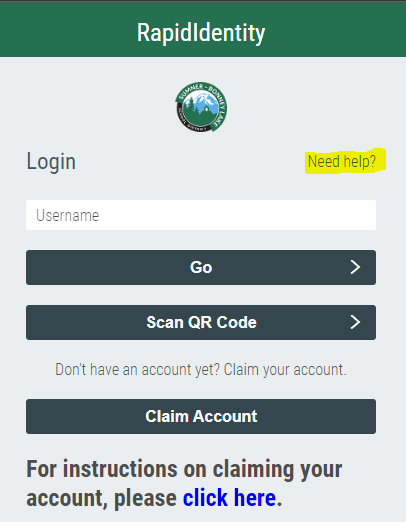
**1**. Go to the RapidIdentity login page

**2**. Click the **Need help?** link above the username field

<table border="1" id="bkmrk--4" style="border-collapse: collapse; width: 29.0123%; height: 311px;"><colgroup><col style="width: 100%;"></col></colgroup><tbody><tr><td>[![image.png](https://wiki.sumnersd.org/uploads/images/gallery/2023-01/scaled-1680-/Ea0KkT1z9ltN8LcP-image.png)](https://wiki.sumnersd.org/uploads/images/gallery/2023-01/Ea0KkT1z9ltN8LcP-image.png)

</td></tr></tbody></table>

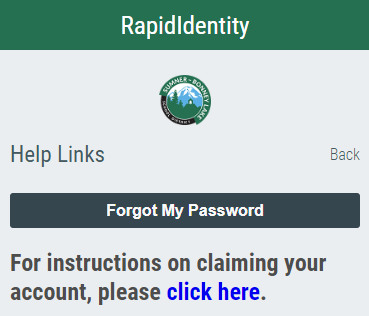
**3**. Click the **Forgot My Password** button

<table border="1" id="bkmrk--5" style="border-collapse: collapse; width: 37.5309%; height: 289px;"><colgroup><col style="width: 100%;"></col></colgroup><tbody><tr><td>[![image.png](https://wiki.sumnersd.org/uploads/images/gallery/2023-01/scaled-1680-/wWQkMgnsgP6SPWay-image.png)](https://wiki.sumnersd.org/uploads/images/gallery/2023-01/wWQkMgnsgP6SPWay-image.png)

</td></tr></tbody></table>

**4**. Follow the prompt to set your new password